Overview
If your Kerio Connect server is not receiving incoming emails, the root cause often lies in DNS misconfiguration, firewall rules, blocked SMTP ports, or inactive services. This guide walks through the necessary checks and resolutions, including the specific "Socket error code 10061" issue.
Common symptoms:
-
No new emails received in the inbox.
-
External senders receive bounce-back messages.
-
Error: "No connection could be made because the target computer actively refused it" (
450 4.4.316 Connection refused [Message=Socket error code 10061]). -
No related entries in Kerio Connect logs (this is a very good indicator that the emails are never reaching the Kerio Connect server, and the issue lies in another place)
Preconditions
Access to Kerio Connect Administration User Interface (UI)
Steps
Verify Hostname Configuration
During the initial configuration of Kerio Connect, you are asked to input the hostname of the Kerio Connect server. The hostname should be valid, which means an A record that points to the Public IP of the Kerio Connect server must exist in the DNS.
-
Go to Kerio Connect Administration > Dashboard or Configuration > Domains.
-
Ensure the server’s hostname has a valid A record pointing to its public IP. Here is an example of A record:
-
To update it, click Internet Hostname in Configuration > Domains.
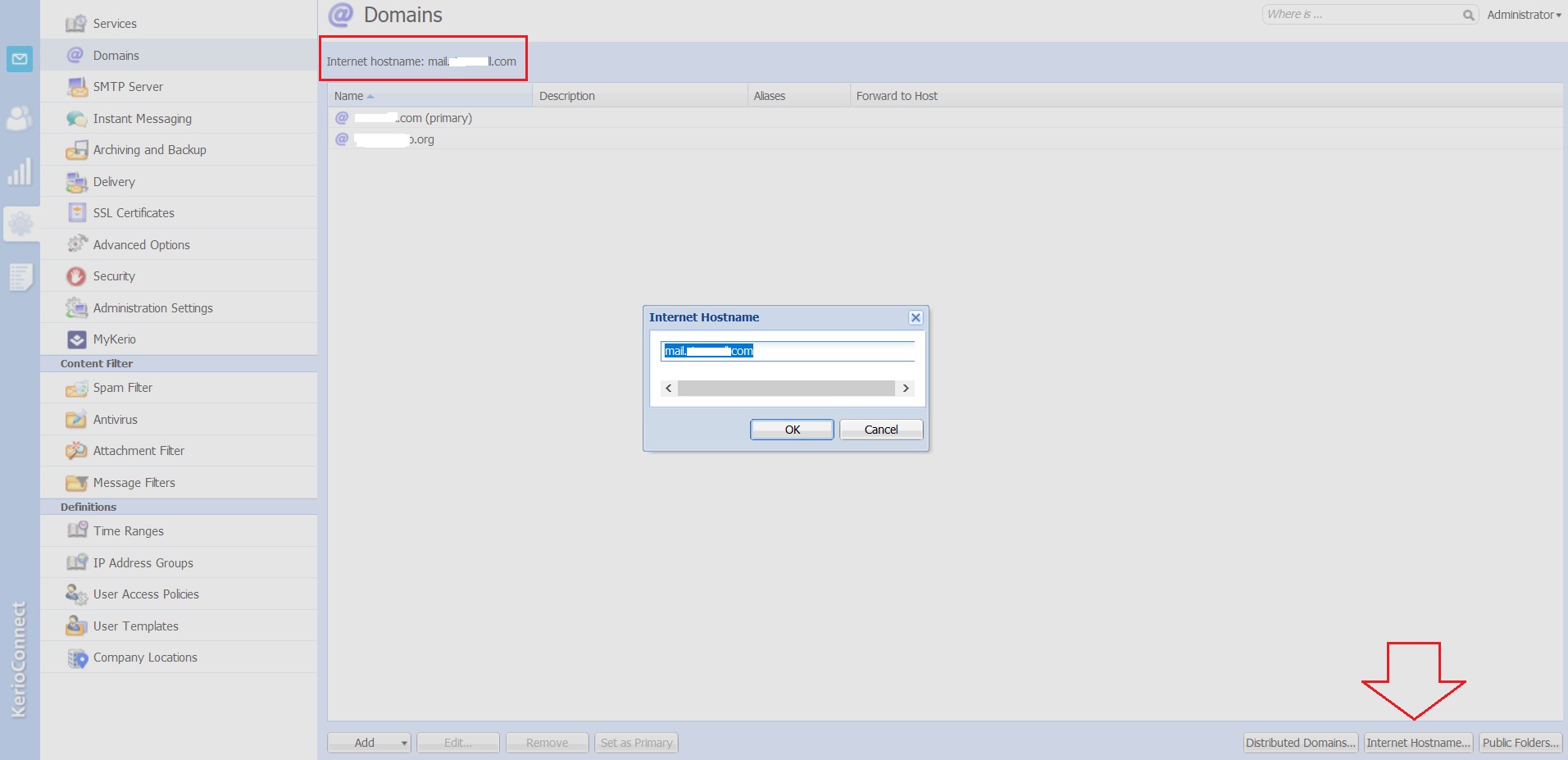

📌 Tip: Use online tools like MXToolbox A record lookup to validate.
Validate MX Records
-
Your domain’s MX record should point to the correct Kerio Connect server.
-
If using a relay or gateway, the MX record must point to their hostname instead.
-
Use MXToolbox MX lookup to confirm accuracy.
📌 DNS changes can take up to 48 hours to propagate globally.
Confirm SMTP Service is Running (Port 25)
Public Mail servers communicate via the SMTP Port 25, so this port should be open.
📌 SMTP port 25 is the industry-standard port for server-to-server email delivery; you cannot use another port for server-to-server delivery (except the case of email relaying, forwarding or SMTP submission).
- In Kerio Connect Administration, go to Configuration > Services and make sure that the SMTP Service is running.
- Make sure that no other application using Port 25 is running on the server.
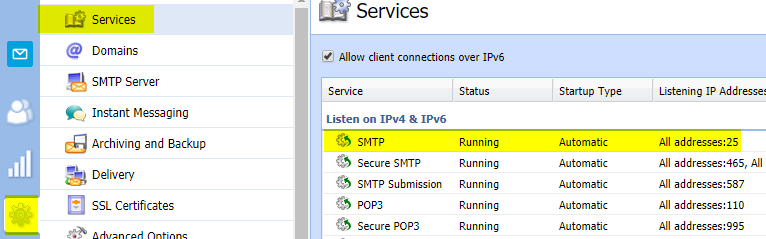
Check Firewall and NAT Port Forwarding
- If there is a firewall in front of Kerio Connect, the firewall must be configured to forward incoming Port 25 traffic to the local IP of Kerio Connect.
- The Built-in Firewall in the OS must also be checked.
- In cases where the firewall GeoIP blocks some connections, you would need to adjust the firewall to allow emails incoming from servers in that specific geographical area
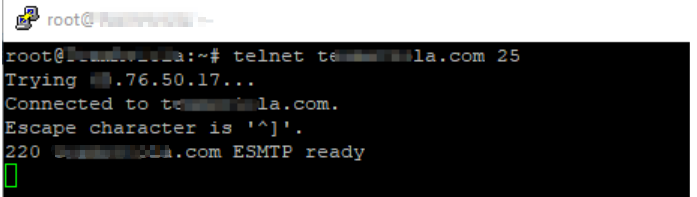
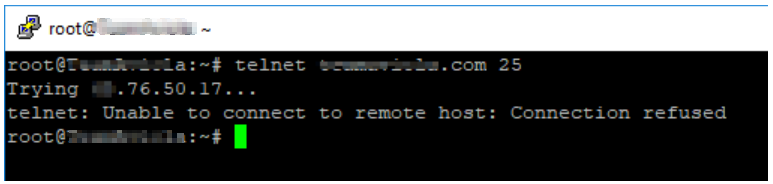
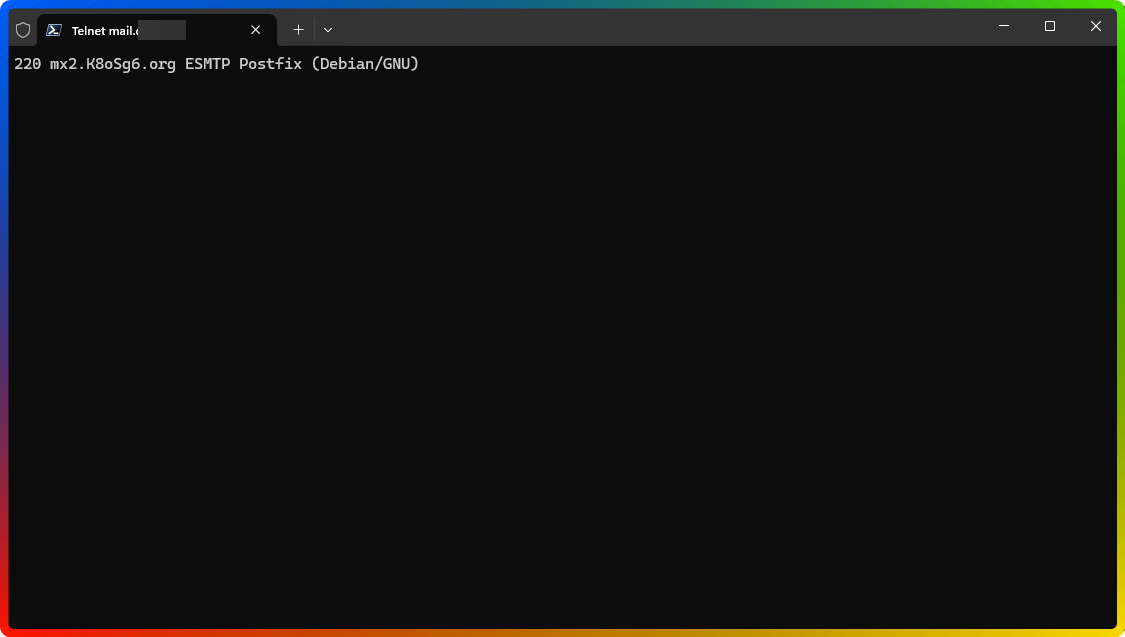
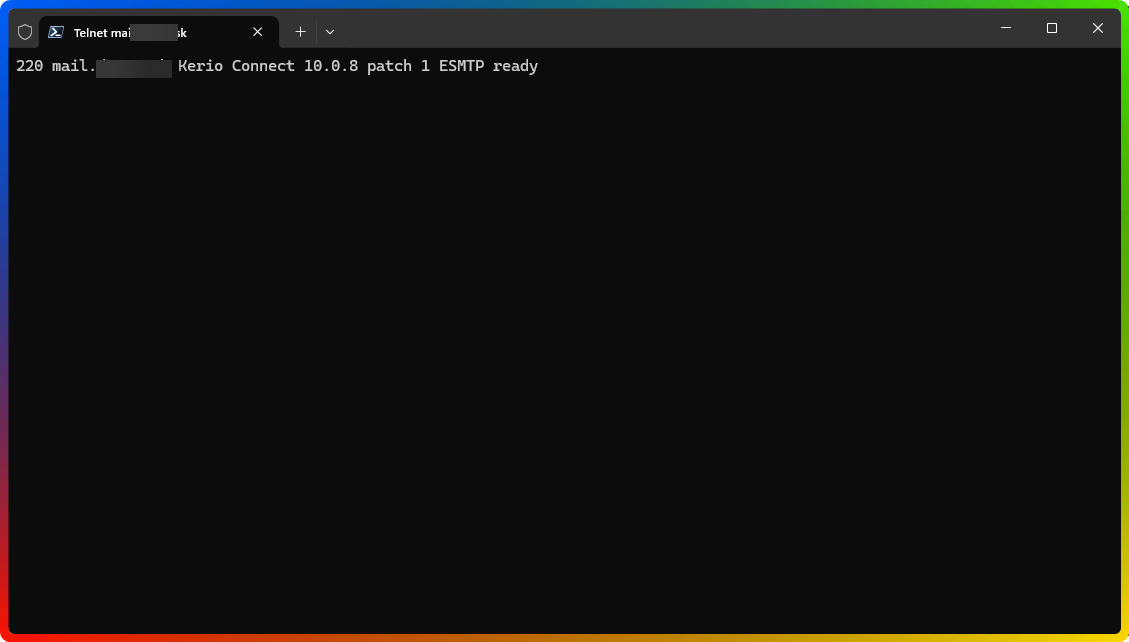
- The best way to check if a port is open is via telnet:
- Open Command Prompt (CMD) or Terminal and type
telnet <hostname> 25.- Port is open:
- Port is closed:
- Port is open:
- The telnet command should be run from both the internal network and from another network; there have been cases where the SMTP traffic coming from the internet was redirected to another mailserver, while telnet from an internal networked showed the correct mailsever
- SMTP traffic being directed to another server:
- SMTP traffic being routed to Kerio Connect correctly:
- SMTP traffic being directed to another server:
- Open Command Prompt (CMD) or Terminal and type
Summary
To restore incoming email flow in Kerio Connect:
-
Confirm DNS A and MX records.
-
Ensure port 25 is open and forwarded.
-
Verify SMTP service is active.
-
Rule out firewall and ISP blocks.
-
Investigate network-level filters or IP-based access controls.
Frequently Asked Questions
Q1. What does the error "No connection could be made..." mean?
A1. It indicates that the server is not accepting connections on port 25, possibly due to firewall blocks, incorrect DNS, or inactive services.
Q2. How can I confirm if SMTP is blocked?
A2. Use Telnet or an online port checker on port 25. If the port is blocked, no greeting from the Kerio Connect server will appear.
Q3. How do I restart the SMTP service in Kerio Connect?
A3. Log in to the Admin UI, go to Configuration > Services, locate SMTP Server, and restart it.
Q4. How do I know that the SMTP traffic is not reaching Kerio Connect?
A4. The SMTP banner shown when running telnet <hostname> 25 will .
Ciprian Nastase
Comments